- - made a delicious quiche from scratch
- - replaced the battery in an iPhone
- - replaced the screen in an iPhone
- - replaced the screen in an HTC Evo
- - dismantled, repaired, and remantled(?) the dishwasher
- - mocked up a pattern in Illustrator for an argyle patterned crochet hat
12.09.2012
Master of None
This weekend, I

11.01.2011
Black Market iPhone Charger
Note: most of this post was written months ago. Since I'm getting more and more into electronics tinkering, I decided to finish it up and publish it.
Have you ever tried to charge your iPod or iPhone with something other than the included charging cable? Then you might have seen this dreaded message:

How does it know? What's special about the Apple USB charger? Doesn't the U in USB mean Universal? Well, yes it does. But for some reason Apple doesn't want just anyone making (or making money from) an iPod/iPhone charger. That's why recent versions of their products don't work with any old charger.
Well fuck them.
Actually, I really like Apple and their products, except for the "non user-serviceable" attitude they have. You can't swap your own battery. You can't modify the hardware in any way without voiding the warranty. Well, I never use warranties anyways.
So here's the deal. I needed a charger for my car. I already have a 5V power supply that is providing in excess of 1A. I just need to be able to put the iPhone into high amperage charging mode and trick it into thinking there is a legit Apple charger doing the charging. The way to do this is kind of sneaky.
USB has only 4 wires. Two for power (a 5V and a ground) and two for data (D- and D+). With any standard USB device, you should just be able to power it with the two power wires. You can leave the data wires unattached.
But with a newer Apple device, if there is nothing on the data wires, then nothing happens! It won't charge! The power is there on the power wires, but your stuck up little iPhone scoffs at it. It can tell that you are using a non-Apple charger because Apple chargers sneakily put a small charge on the data wires.
To fake an Apple-supported wall charger, put 2.0V on D- and 2.8V on D+. To fake an Apple-supported computer charger, put 2.0V on both the D- and D+ wires. The distinction here is that the wall-charger will draw a full amp or more, whereas the computer charger will only draw half an amp, to adhere to the USB spec.
So I went to Fry's to get some resistors and a female USB port and was in business.
Materials used
- 24 hour fitness membership card
- 2x 51K Ohm resistors
- 1x 47K Ohm resistor
- 1x 75K Ohm resistor
- solder
- electrical tape
- female port from a usb extender
- wire
Tools used
- drill
- soldering iron
- wire cutters/strippers
- voltmeter
- The Internet
First, I drew out a schematic. It's not very complex, but it was fun flashing back to high school AP physics!

Then I drilled a bunch of holes into my 24 hour fitness card and started soldering and taping. Here's the finished product:

This is now tucked away behind my dashboard, powering my iPhone every time I plug it in, without having to buy a special charging cable.
References:
USB connector pinout
iPhone dock connector pinout
Resistors on the D-/D+ USB pins for iPhone
MintyBoost! (provided much background information for these types of hacks)
MintyBoost! video teardown of charger
Resistor band color guide
Apple's own documentation regarding power through USB
Have you ever tried to charge your iPod or iPhone with something other than the included charging cable? Then you might have seen this dreaded message:

How does it know? What's special about the Apple USB charger? Doesn't the U in USB mean Universal? Well, yes it does. But for some reason Apple doesn't want just anyone making (or making money from) an iPod/iPhone charger. That's why recent versions of their products don't work with any old charger.
Well fuck them.
Actually, I really like Apple and their products, except for the "non user-serviceable" attitude they have. You can't swap your own battery. You can't modify the hardware in any way without voiding the warranty. Well, I never use warranties anyways.
So here's the deal. I needed a charger for my car. I already have a 5V power supply that is providing in excess of 1A. I just need to be able to put the iPhone into high amperage charging mode and trick it into thinking there is a legit Apple charger doing the charging. The way to do this is kind of sneaky.
USB has only 4 wires. Two for power (a 5V and a ground) and two for data (D- and D+). With any standard USB device, you should just be able to power it with the two power wires. You can leave the data wires unattached.
But with a newer Apple device, if there is nothing on the data wires, then nothing happens! It won't charge! The power is there on the power wires, but your stuck up little iPhone scoffs at it. It can tell that you are using a non-Apple charger because Apple chargers sneakily put a small charge on the data wires.
To fake an Apple-supported wall charger, put 2.0V on D- and 2.8V on D+. To fake an Apple-supported computer charger, put 2.0V on both the D- and D+ wires. The distinction here is that the wall-charger will draw a full amp or more, whereas the computer charger will only draw half an amp, to adhere to the USB spec.
So I went to Fry's to get some resistors and a female USB port and was in business.
Materials used
- 24 hour fitness membership card
- 2x 51K Ohm resistors
- 1x 47K Ohm resistor
- 1x 75K Ohm resistor
- solder
- electrical tape
- female port from a usb extender
- wire
Tools used
- drill
- soldering iron
- wire cutters/strippers
- voltmeter
- The Internet
First, I drew out a schematic. It's not very complex, but it was fun flashing back to high school AP physics!

Then I drilled a bunch of holes into my 24 hour fitness card and started soldering and taping. Here's the finished product:

This is now tucked away behind my dashboard, powering my iPhone every time I plug it in, without having to buy a special charging cable.
References:
USB connector pinout
iPhone dock connector pinout
Resistors on the D-/D+ USB pins for iPhone
MintyBoost! (provided much background information for these types of hacks)
MintyBoost! video teardown of charger
Resistor band color guide
Apple's own documentation regarding power through USB
10.24.2011
Arduino Development Challenges
Here is a snippet of code from a sample Arduino sketch I've been toying with:
TCCR2A = (TCCR2A | _BV(COM2A1)) & ~_BV(COM2A0);
TCCR2A &= ~(_BV(COM2B1) | _BV(COM2B0));
What... the... fuck? The only thing I remotely recognize are the operators - and even those are all scary and bit-wise. TCCR2A, _BV(), COM2A1... what are these things? They are certainly not defined anywhere in this sketch. Nor are they it defined in any of the manually linked files or libraries. To me, this exemplifies that the hardest part about learning an entirely new vertical system at once is not knowing at what level constructs live.
Now, I do know what this code is supposed to be doing. It's commented rather well, actually. And looking at it alongside the Arduino datasheet I can tell the what. But I need to know the how. It's like being able to understand pre-made sentences in a foreign language, but not being able to create your own. In order to form my own, I need to know what each part does.
TCCR2A
Let's start with what it is supposed to be doing. It's supposed to be setting the Compare Output Mode (COM) on Timer 2, by setting the appropriate COM bits in the TCCR2A register. The TCCR2A register, like many on the Arduino, is an 8 bit bitmask. It look like this:
TCCR2A
bit| name | explanation
---+--------+-------------------------
7 | COM2A1 | Compare Output Mode A
6 | COM2A0 | Compare Output Mode A
5 | COM2B1 | Compare Output Mode B
4 | COM2B0 | Compare Output Mode B
3 | - | reserved
2 | - | reserved
1 | WGM21 | Waveform Generation Mode
0 | WGM20 | Waveform Generation Mode
The first thing to understand is that the names of all the Arduino registers (TCCR2A, TCCR2B, and about 90 others) are global, read-write variables containing the bitmask value in the register. On bootup, when all the bits in TCCR2A are set to 0, the value of TCCR2A is B00000000 (that's Arduino shorthand for binary 0). And at any time in your sketch you can set TCCR2A = B01010101 or whatever you want. TCCR2A is defined as:
#define TCCR2A _SFR_MEM8(0xB0)
_BV()
_BV() is defined in sfr_defs.h:
#define _BV(bit) (1 << (bit))
OK, so bitwise-shift a 1 a certain number of positions to the left. I get it on a technical level, but it doesn't make sense to me yet on a conceptual level. Especially not knowing exactly what types of values are typically passed it (the name of the argument - bit - implies some meaning there...)
By the way, the accepted mnemonic is "Bit Value".
COM2A0 and the rest
The answer that took me the longest to grok was this: the names of the bits (COM2A1, COM2A0, etc.) are NOT defined variables for the values of those bits. They are instead constants which contain the bit's location relative to the byte in which they reside. In other words:
#define COM2B0 4
#define COM2B1 5
#define COM2A0 6
#define COM2A1 7
Putting it all together
Now back to the sample code I'm trying to understand:
TCCR2A = (TCCR2A | _BV(COM2A1)) & ~_BV(COM2A0);
TCCR2A &= ~(_BV(COM2B1) | _BV(COM2B0));
AHA! To set the COM2A1 bit to ON (what it actually does is unimportant to this post), you shift an 'ON' bit (a one) left by the correct number of positions (7) and then bitwise-or it onto the byte!
TCCR2A |= _BV(COM2A1) // turn ON the COM2A1 bit
And to set the COM2A0 bit to OFF, you start the same way (in this case shifting a one 6 bits to the left) but negate it and bitwise-and it onto the byte!
TCCR2A &= ~_BV(COM2A0) // turn OFF the COM2A0 bit
What a trip. I'm still trying to think of whether I like this notation or not. Most of the alternatives I can come up with each have their own faults. This method is at least fairly self-documenting once you know it.
References:
grep define /Applications/Arduino.app/Contents/Resources/Java/hardware/tools/avr/etc/options/gcc-version/include/avr/iom328p.h | less
http://www.arcfn.com/2009/07/secrets-of-arduino-pwm.html
http://smacula.blogspot.com/2011/04/creating-variable-frequency-pwm-output.html
10.18.2011
Arduino - Day 1
I ordered an Arduino (Duemilanove) and a starter kit from Amazon. The Arduino came today, but it turns out I never ordered the kit - I just left it in my cart and one-click ordered the Arduino. Anyways the point is I was left with a board but no wires/sensors/actuators/anything to do anything with.
All the Arduino came with is the board itself. (It was prebuilt; I didn't need to assemble/solder it together.) Luckily I have a box of electonic odds and ends to pick through.
 First up, I found a USB A to B cable from who knows what - an old printer maybe. This is essential to powering the Arduino and being able to execute code on it.
Then I took apart a cheap headlamp (I think I bought a 3-pack for $10 at Home Depot during the great San Diego blackout of 2011). I was able to salvage 5 white LEDs, a few bits of wire, a momentary switch, and a possibly useful 3xAAA battery harness.

Lastly I found an old cell phone - we're talking an LG clamshell design from 2000 or so.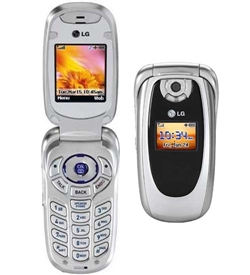
I've never taken apart this phone before, but I was able to take out the speaker and vibrating motor, identify which was which, and hook them up to an external power source without blowing them up.
I also have a handful of resistors, a few spools of wire, wire cutters, soldering iron and solder, and a multimeter. And who knows what else lying around in the closet that I can dissect tomorrow.
With these scavenged components, here's what I was able to do so far today:
- install Arduino IDE and test the board
- blink a single LED
- 5 LED array that flashes a static pattern (1-2-3-4-5-4-3-2-1-2-3-4-5-4-3-2-1...)
- 5 LED binary counter with button. When you click the button it increments the counter. When you hold the button it resets the counter.
- hook up the speaker and play an 8-bit "shave-and-a-haircut"
- button and speaker: click the button to hear a square wave, release for silence, hold the button to cycle up and down in frequency
- convert an audio file to 8bit 8k PCM unsigned wav, load it on the Arduino, and play it (!!!!)
- hook up the vibrating motor to the switch
These things feel like magic. I love being able to understand the whole process vertically: both the down and dirty electronics and the software. That I can hook up a bunch of wires, write a bunch of numbers to flash memory, press a button that I wired and have recognizeable sound come out of a speaker.... is invigorating.
I already know what big project I want to work towards and that's what is steering my exploration. But at this point, this tinkering process is such a good learning tool. Just today I've learned so much about the Processing language, the Arduino platform, electronics components and theory, and a few mac and unix goodies (ffmpeg conversion, editing and cat'ing a wav header onto a headerless chunk of wav data... ) This is fun :)

All the Arduino came with is the board itself. (It was prebuilt; I didn't need to assemble/solder it together.) Luckily I have a box of electonic odds and ends to pick through.
First up, I found a USB A to B cable from who knows what - an old printer maybe. This is essential to powering the Arduino and being able to execute code on it.Then I took apart a cheap headlamp (I think I bought a 3-pack for $10 at Home Depot during the great San Diego blackout of 2011). I was able to salvage 5 white LEDs, a few bits of wire, a momentary switch, and a possibly useful 3xAAA battery harness.
Lastly I found an old cell phone - we're talking an LG clamshell design from 2000 or so.
I've never taken apart this phone before, but I was able to take out the speaker and vibrating motor, identify which was which, and hook them up to an external power source without blowing them up.
I also have a handful of resistors, a few spools of wire, wire cutters, soldering iron and solder, and a multimeter. And who knows what else lying around in the closet that I can dissect tomorrow.
With these scavenged components, here's what I was able to do so far today:
- install Arduino IDE and test the board
- blink a single LED
- 5 LED array that flashes a static pattern (1-2-3-4-5-4-3-2-1-2-3-4-5-4-3-2-1...)
- 5 LED binary counter with button. When you click the button it increments the counter. When you hold the button it resets the counter.
- hook up the speaker and play an 8-bit "shave-and-a-haircut"
- button and speaker: click the button to hear a square wave, release for silence, hold the button to cycle up and down in frequency
- convert an audio file to 8bit 8k PCM unsigned wav, load it on the Arduino, and play it (!!!!)
- hook up the vibrating motor to the switch
These things feel like magic. I love being able to understand the whole process vertically: both the down and dirty electronics and the software. That I can hook up a bunch of wires, write a bunch of numbers to flash memory, press a button that I wired and have recognizeable sound come out of a speaker.... is invigorating.
I already know what big project I want to work towards and that's what is steering my exploration. But at this point, this tinkering process is such a good learning tool. Just today I've learned so much about the Processing language, the Arduino platform, electronics components and theory, and a few mac and unix goodies (ffmpeg conversion, editing and cat'ing a wav header onto a headerless chunk of wav data... ) This is fun :)
8.22.2011
Rocky's Wild Ride
 Meet Raquelle the Otter, aka "Rocky". She is our frisbee team's mascot and dear friend. This is the story of her dastardly kidnapping and daring rescue; a tale of high-stakes internet detectivery and good old-fashioned breaking and entering; of intrigue, deceit, betrayal and redemption.
Sunday
Someone covertly steals Rocky, our team's plush pink otter mascot, from our sideline during the finals. We were on such a high from winning the tournament that I forgot to make sure she got home safe. As I'm driving home, I think "Hmm, I wonder who has Rocky", assuming K-na or Micah or another teammate picked her up to take her home.


 It's arts and crafts time. I pack a few screwdrivers, an exacto knife, sharpies, and rope with me. I cut out some little Master Shake hands. I go to Von's, buy bendy straws. I go to a cheap-o mexican place and get a big old styrofoam cup (and a bacon burrito, naturally). Then I put it all together into a Master Shake replica that I can swap out with Rocky once I find her, which I WILL do, today.
Monday
A few OnTheRockstars get emails and facebook messages from "Stolen Otter" on facebook. There is a picture of Rocky bound and blindfolded against an anonymous blue cloth. There are some demands:
Dearest OTR,
Congratulations on winning your tournament!
btw I stole your otter.
Please know that the last thing I want to do is harm a pretty little pink hair on her body. However, returning Rocky to safety will come at a price. I have 4 simple demands that will return Rocky to you in good health. Please take a picture of these demands and post them on this page to prove you are serious about her return. They are the following:
1) Have everyone on OTR friend request me.
2) A picture of Pumba wearing a dress. (Heels as well if you can find them in his size.)
3) Brett wearing the t-shirt that will be provided for him at the DUDE tournament on Saturday for no shorter length than one point.
4) Have K-Na perform a "K-Nasty rap" and post the Youtube link on this page. (Rocky will be returned faster if she looks ghetto. We're talking bandaid under the eye status.)
These are my demands. You have one week to complete. Once all photos and videos are posted on facebook, I will have Rocky the Otter dropped off at a specified location. I will send you a message of where and when. Thank you for your cooperation. Do not contact the authorities or Rocky gets it. - The Otter ThiefWe assume it's someone from our friendly rival San Diego team Milkshake. I immediately suspect Karen and Paul, with possible involvement from Lemos, Bunk, Tracey, Aiza, or Darin. There is an initial flurry of emails to our mailing list as we try to wrap our heads around what has happened, and try to get everyone to friend the proper page on facebook to satisfy the first demand.
Tuesday
I whip up an online trap for the culprits. It has two phases:
Phase 1) Find a cute otter picture on google image search, post it to an innocuous web server that I control, and send a link to the picture to the Stolen Otter facebook account. Whoever logs into that account will click on that link, accessing my web server, and leaving behind a log of their IP address.
Phase 2) Knowing that the thieves are very likely registered on the DUDE website, alter the site to keep logs of IP addresses in conjunction with DUDE user accounts. In this way I can identify the DUDE user for each IP that connects to that site.
After this code is in place, I just have to wait for the otter thieves to 1) click on the link I sent them and 2) check the DUDE site for their team schedule or other info. If they do both of those from the same computer, each will have the same IP address and I can cross reference them and see who they are!
This is not a foolproof scheme, but it's a place to start.
Tuesday Night
I get home from DUDE around midnight. I check the online logs from both phases. There are not one, but TWO hits on the cute otter picture I sent to the Stolen Otter account. One of the IP addresses also accessed the DUDE site a little earlier in the day! That means I can track otter thief number 1. It turns out to be.... Bunk.
The other IP address that accessed the cute otter picture does NOT access DUDE, so I can't directly find out who it is. I can find out who owns the IP address, but it is just part of a large chunk of IPs owned by Cox. Without access to Cox's servers, there's no way for me to find out which of their customers was using this IP at that time.
However there was some other information I was able to glean from the second, unknown IP address. First of all, it was accessed from a normal desktop browser - not one on a mobile phone. And secondly, the unknown IP accessed the cute otter picture around 9pm. I was at DUDE all night, and I know that certain people were there all night and had no way to access a computer at 9. Because of this, Karen and Lemos get crossed off the short list of suspects.
Bunk has pictures of his apartment posted on facebook, along with the address. Pictures of the outside, the inside, and the surrounding area. I can tell the whole layout of the apartment based on all of this, and can tell which windows are his and where each room is as easily as if I were standing in his apartment. I decide to swing by the next day and see if I can sneak in a window. At this point I'm pretty sure I know exactly where Rocky is. I'm convinced because of the IP data, and because it "feels" like it could be Bunk's doing. I assume the other unknown IP address is Paul, because he seems like the next likely suspect. I'm psyched. It's 3am and I can barely sleep because I'm so excited to break into Bunk's.
Wednesday
I wake up and check the Stolen Otter facebook page. There is a new profile photo, showing Rocky perched precariously over a boiling pot of water. I take special notice of the style of stove and of the surrounding faux-wood countertop. I save a copy of the pictures in case they are later deleted. And in fact, someone does try to hide a little more detail later by changing the picture to the bottom picture below - cutting out the counter out.


I check the images of Bunk's apartment, and compare the stove there with the stove in the profile picture. It's NOT a match. At this point I'm a little deflated. I was so sure it was Bunk, but clearly that was someone else's stove. There was at the very least one more accomplice, and I was no closer to figuring out who that was. I held off on the sting operation I had planned.
Wednesday Night
Talking at Porter's with Kief, Becky, Phil, Zeff after DUDE. We start talking about me raiding Paul's place the next day, possibly bringing Suzanne with me to climb through the doggy door. Becky is taking K-na's dog that night and for all of Thursday, and she offers to call Paul/Roberta to see if their dogs are available for a playdate, or more importantly whether Paul and Roberta themselves will be home that day.
Thursday
I get notified from Becky that Paul and Roberta are in fact gone for the day, at work. I cruise over to their place to scope it out. I'm walking around their neighborhood for a few minutes before I find their place. I'm pretending to talk on the phone, walking up and down the same street, the same few driveways, for way too long if anyone in the neighborhood is actually paying attention. I'm peeking over fences, creeping through back yards. I'm basically being so sketchy.
Finally, I find their place. I freeze for a moment because the front door is actually wide open. Crap, what if they are home? How do I explain my visit? I get to the front door and the heavy duty screen/security door is closed and locked. As soon as I get within a few feet of it, their dogs start barking wildly at me. So I walk over to the side yard, and they come out the doggy door. As soon as I reach out my hand to pet them, they shut up and start licking me. Maybe it was my soothing tones, or familiar smell, who knows. At this point I feel that I've already been around too long - I don't want to climb in the doggy door in case anyone in the neighborhood has already taken notice of me.
So I can't get in, but I peer through the front door into the kitchen. I can't see the stove, but the countertop I can see is tile - not faux-wood - and I decide the otter is probably not there anyways. I leave.
Friday
Time is running out. The demands made by the otter thieves are supposed to all come out Saturday at the DUDE tournament. I've all but exhausted my options for how to try to get Rocky back on my own. Up until now I've been doing most of the legwork myself, not knowing who to trust. K-na and Micah, surely. But I had been so paranoid that I thought anyone else - even a teammate - could be in on it, just for the fun of it.
I check for more activity on the cute otter picture, and there has been a new hit since Wednesday. This new IP did NOT access the DUDE web page, so I can't tell directly who it is. But the whois on it comes back as being owned by MedImpact. This is more promising than just being an anonymous Cox IP like the last one.
I look up MedImpact online. Facebook, LinkedIn, Google. At this point I decide I need help if this thing is going to go down. I bring the rest of the team into the fold via our team's mailing list, asking who we know that works at MedImpact. OnTheRockstars jump to action. Pebbles and Whitey were all over the internet with me, looking for clues, coming up with ideas. I go through the list of 400+ employees that LinkedIn knows at MedImpact, and don't find anyone I recognize. But LinkedIn says Sharon knows someone that works there. I briefly suspect Sharon of being in on the kidnapping (like I said, paranoid) and I text her to get more info or to smoke her out. She tells me the name of her contact at MedImpact. I look him up on Facebook and he and I have two mutual friends: Sharon (expected) and Roberta (unexpected!!) Sharon tells me that the place Roberta works had their servers co-located with MedImpact's recently. Therefore it's entirely likely that Roberta checked the Stolen Otter facebook account from work and it showed up as MedImpact in my server logs. Awesome! We now know with reasonable certainty that both Bunk and Roberta are involved. But the question remains: whose stove is in the picture?!
Action
I spring into action. Kief and I had previously fleshed out a plan for what to do if I found Rocky. I needed to be able to send Milkshake a message.
 It's arts and crafts time. I pack a few screwdrivers, an exacto knife, sharpies, and rope with me. I cut out some little Master Shake hands. I go to Von's, buy bendy straws. I go to a cheap-o mexican place and get a big old styrofoam cup (and a bacon burrito, naturally). Then I put it all together into a Master Shake replica that I can swap out with Rocky once I find her, which I WILL do, today.
 First stop: Back to Paul and Roberta's. Last time I was there I didn't actually see the stove, and Roberta's newly verified involvement via the IP trace means I need to be actually see her stove to be sure. I check with our email list to see if anyone knows if Paul or Roberta are home. Alicia comes back with this gem:
So this time I go back, feed the dogs some ham (c'mon, we've all seen heist movies before), crawl in through the doggy door, and search their apartment. The stove is not a match, and there is no otter to be found.I have it on good authority that they are both at work today. and also, that their dogs are easily distracted by ham.
Next: to Bunk's! Maybe he got a new stove since the reference picture I saw on facebook. It's worth a shot. I get there, but there are so many people around, and his place is pretty out in the open, so I can't get in. I can't even see in the windows. I leave, still thinking Rocky could possibly be inside.
Then: To the Lemos Pad! His roommates let me in. I'm making conversation with his roommates and making my way casually towards the kitchen. It's past noon and one of his roommates is cooking eggs on the stove. The stove, which is not a match. I excuse myself to leave. On my way out, one of his roommates says "I'll tell Scott you stopped by." I turn around and say "You know what? Don't. This was going to be a surprise." I flash him a disarming grin and walk out.
Lastly: To Karen's. Yes, she had an alibi for not being available to check the Stolen Otter facebook account at 9pm on Tuesday, but I still can't rule out her stove until I see it. I email the list to get her address. Alisha responds again:
I have it on good authority that Karen also likes hamI giggle. Pebbles comes through with Karen's address. I can't get into her house, but I can peek in the windows and see her stove. She's clean. The whole team has been following my progress on the mailing list, and providing motivation and help. They've been emailing me addresses for these houses, offering to call people's workplace to make sure they are at work (and not at home). Now I have to head home and have to face facts that, again, I'm out of options.
Out of Nowhere, Drewbop!
Who even knew Drewbop was still on the OTR mailing list? Not me. With one simple email, Drewbop reinvigorates the search:
Bunk has moved in the past couple months. Facebook pic might be his old one.I check the uploaded date on Bunk's house pictures. They were uploaded about a year ago. That means that if Bunk moved recently, the pictures I had been using for his place are way out of date. That means that he lives somewhere else now. That means.... that I almost broke into some random person's apartment earlier today. Wow.
It also means we need Bunk's new address. Now I'm SURE Rocky is at Bunk's. It all makes sense. I start texting anyone who knows Bunk. Griffin, Molly, Drew, but no one has his new address. Surely people on Milkshake have it, but I can't ask them. We try Facebook and LinkedIn again. I text Sharon to try to get her to tell Bunk she has a job in mind for him and to ask for his resume. She doesn't respond in time so we bail on that idea. Jamie suggests getting a fellow alumni from his school to look it up in their alumni database. I assume that he doesn't keep his alumni association updated, and we don't know another alum anyways, so we bail on that idea.
Time to get serious. I text Maddie.
I need a big favor ASAP. Do you know Bunk enough to text him and ask for his address so you can send him a postcard?Within 10 minutes I have Bunk's current address in PB. It's getting late in the afternoon. There's a party later that night that I know Bunk will be at, so the backup plan is to try to get his keys from him at the party and then go back to his house. But first, I want to try to get in there NOW.
Calling for backup
I scout out Bunk's place online, but can't come up with much. Google maps doesn't really show it since it's off the street a little bit. I don't know if he's home, and there are just a lot of unknowns at this point. I need help. An accomplice. I call up Philthy.
me: "Hey, what are you doing this afternoon"
phil: "Oh, I'm just about to..."
me: "Nope. No you're not. You're coming with me to break into Bunk's house to find my otter."
And he jumps at the chance. This is why Phil and I are friends. We toss around some slightly off kilter ideas about how to see if he's home without giving ourselves away. Phil suggests throwing tennis balls at his door while hiding across the street. We think about asking a passing stranger to knock for us. We consider simply overpowering Bunk if he answers the door. Or maybe we could have someone make an excuse to come over before the party, and leave the bathroom window unlocked before leaving. I try to get Maddie to find out if he's home, but Bunk is not answering texts. K-na tries to text him about the party and what he is doing until then, but no answer to that either. So Phil and I agree to meet up near Bunk's place, at Von's, and walk over and go from there with very little of a plan in mind.
We get to Bunk's, and find his apartment building behind a vacant house with a For Rent sign. On our way back, we stop at his mailbox and find out he has a roommate, and we get his name. We walk into his apartment's courtyard and locate his door, but don't stay long enough to arouse suspicion or let ourselves be seen. We walk away, trying to hatch a plan. We go to Jamba Juice to mull over our options. As I'm ordering a delicious banana berry smoothie, Phil snaps his fingers, clearly with an equally delicious idea: Let's order a pizza.
Let's Order a Pizza
I told him I wasn't that hungry, and he told me I was missing the point: we can order a pizza and have it delivered to Bunk. That way we can see if he's home without giving ourselves away. Brilliant! We hammer out the specifics, and put the plan into action. We specifically didn't order a bacon pizza so as not to give my involvement away.
So we go back over to his place and wait. Just two sketchy guys waiting in front of someone's house, on the street, in broad daylight. You know, no big deal. After about 10 minutes a neighbor comes out and approaches us. We say we're interested in renting the house in front, the one with the For Rent sign, and ask him all sorts of questions about it. We're so smooth. The only problem is, now this guy has answered all our questions and we have no real excuse to stick around, but we still have to wait somewhere for the pizza. So we loop around to the alley behind Bunk's.
Just two sketchy guys waiting behind someone's house, in the alley, in broad daylight. You know, no big deal. People are coming and going, eying us but not approaching us. I'm a little nervous at this point. I think about canceling the pizza order and just trying the backup plan for the party that night.
Just then, the pizza delivery pulls up. She's a mid-40's mexican woman in a Papa John's uniform. I ask her if she'll do us a favor. We're trying to play a prank on our friend, but we don't know if he's home or not. I tell her to go up there with the pizza: if no one is home, then great, come back down. But if someone does answer, they'll be confused about not ordering a pizza, so just pretend you have the wrong apartment and come back down. Meanwhile, my friend and I will hide behind this tree so we can watch who comes to the door. Not sketchy at all, right? Well the delivery woman totally goes for it. She goes up, and nobody is home. So we pay her, take the pizza, and send her on her way. With nobody home, it's time to break the fuck in and get Rocky back.
Breaking the Fuck In
It's an upstairs apartment. We bring the pizza and go up the exterior stairs. I try the door; it's locked with a deadbolt. Phil tries the one window we have access to, above the stairs. The screen pries off with a little effort and the window, unlocked, easily slides open. Phil boosts me into the window. I dodge the large flat screen TV which is just inside the window, and I'm in. Phil closes the window behind me and I go to work inside while he tries to look inconspicuous outside.
I run into the kitchen to check out the stove. The image of poor Rocky suspended over a pot of boiling water was burned into my memory at this point. I recognized the stove immediately. THIS WAS THE RIGHT PLACE. I search the kitchen for Rocky. Not there. Around the corner to the bedroom, and I immediately see her on the bed. JACKPOT. Grab Rocky. She's safe. Now the fun part.
I put a pot of water on the stove and get out the Master Shake replica I made. I tie it up, shove a knife through its head, and leave it suspended over the pot of water for Bunk to discover. BOOM.
 And that's how you prank a prankster.
 And that's how you prank a prankster.
8.16.2010
Time Machine backups over network share
The next time something catastrophic happens to my MacBook Pro and I need to restore from a Time Machine backup, I want to remember this link.
Most pages that come up when google researching tell you to...
1) enable unsupported drives with
defaults write com.apple.systempreferences TMShowUnsupportedNetworkVolumes 1
2) create a sparsebundle locally
3) copy it to your network share
...but forget the last crucial step:
In the root of the sparsebundle, create a file com.apple.TimeMachine.MachineID.plist containing:
where YOURUUIDHERE is a string containing dashes which can be obtained from
> system_profiler | grep UUID
I could have saved myself a lot of hours of frustration if I could have found this link more easily. The bash script hosted there in particular works wonders. With this knowledge I was able to change an existing Time Machine backup's UUID to match that of my current machine and get into the backup to restore files. I can't explain how happy I am about that.
Most pages that come up when google researching tell you to...
1) enable unsupported drives with
defaults write com.apple.systempreferences TMShowUnsupportedNetworkVolumes 1
2) create a sparsebundle locally
3) copy it to your network share
...but forget the last crucial step:
In the root of the sparsebundle, create a file com.apple.TimeMachine.MachineID.plist containing:
<?xml version="1.0" encoding="UTF-8"?>
<!DOCTYPE plist PUBLIC "-//Apple//DTD PLIST 1.0//EN" "http://www.apple.com/DTDs/PropertyList-1.0.dtd">
<plist version="1.0">
<dict>
    <key>com.apple.backupd.HostUUID</key>
    <string>YOURUUIDHERE</string>
</dict>
</plist>
where YOURUUIDHERE is a string containing dashes which can be obtained from
> system_profiler | grep UUID
I could have saved myself a lot of hours of frustration if I could have found this link more easily. The bash script hosted there in particular works wonders. With this knowledge I was able to change an existing Time Machine backup's UUID to match that of my current machine and get into the backup to restore files. I can't explain how happy I am about that.
7.11.2010
Karma
I live in my car. I was robbed of thousands of dollars worth of stuff. I got a speeding ticket. I'm more and more frequently getting woken up at some ungodly hour and told to "move along".
A friend of mine said to me "You are so due for a good week".
Due? Karma? Nonsense. At least I hope its nonsense because otherwise I'm due for something horrible.
I live in San Diego, the city of constant 70 degree weather. I have a job that pays well and challenges me. Twice a week I get to do my two favorite things in the world (play ultimate and karaoke). I travel often. I had an amazing weekend at Potlatch. I have awesome hair. I meet interesting new people all the time. I have two coasts worth of friends who love me and care about me. I'm in great shape.
How awesome do I feel? How good do I have it? If I believed in karma, I'd be walking around in a helmet and a full body, flame retardant, protective suit.
With a parachute.
Subscribe to:
Posts (Atom)